
n8n Self-Hosting: 5 Costly Mistakes That Will Bite You Later
Self-hosting n8n can save you thousands in automation costs. It can also cause catastrophic failures if you skip critical steps.
We’ve seen businesses lose weeks of workflow history, expose credentials to the internet, and wake up to crashed instances—all from avoidable mistakes.
This guide covers the five most common n8n self-hosting errors and how to prevent them. If you’re running n8n on your own infrastructure (or planning to), read this first.
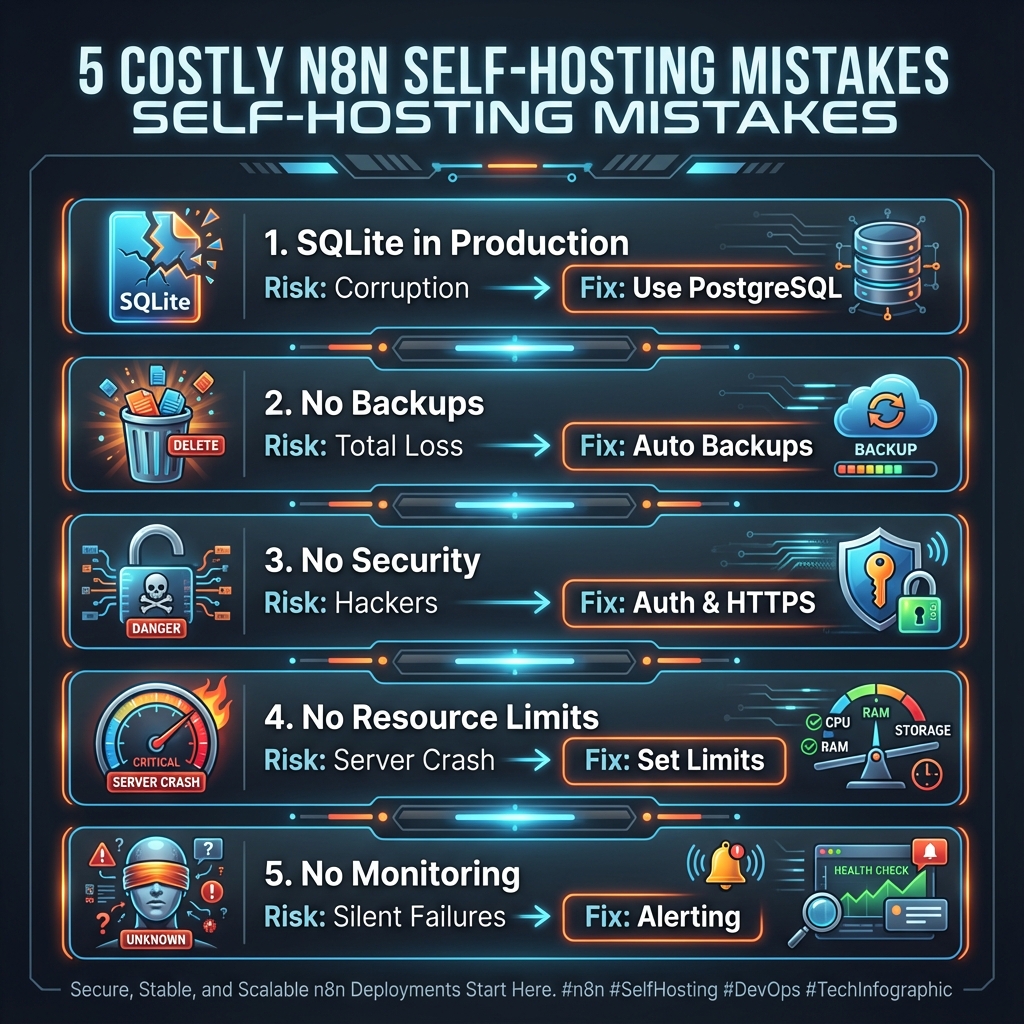
Mistake #1: Using SQLite in Production
SQLite is n8n’s default database. It’s simple, requires zero configuration, and works fine for testing.
It’s also a ticking time bomb in production.
What Goes Wrong
SQLite stores everything in a single file. This creates problems at scale:
- Concurrent access issues: Multiple workflow executions can corrupt the database
- No replication: Your data lives in one place with no redundancy
- Performance degradation: Large execution histories slow everything down
- Backup complexity: You can’t safely back up while n8n is running
The Real-World Impact
A marketing agency ran n8n on SQLite for six months. One day, their instance crashed during a high-traffic campaign. The database file was corrupted. They lost:
- 3 months of execution history
- Debug data for 50+ workflows
- Credential configurations (recoverable, but painful)
Rebuilding took a week.
The Fix
Use PostgreSQL. It’s what n8n recommends for production, and for good reason:
- Handles concurrent connections properly
- Supports replication and point-in-time recovery
- Performs consistently at scale
- Enables hot backups without downtime
Setting up Postgres adds maybe 30 minutes to your initial deployment. That investment prevents disasters.
# In your n8n environment config
DB_TYPE=postgresdb
DB_POSTGRESDB_HOST=your-postgres-host
DB_POSTGRESDB_DATABASE=n8n
DB_POSTGRESDB_USER=n8n_user
DB_POSTGRESDB_PASSWORD=secure_password
If you’re already on SQLite, migrate now. The n8n documentation covers the migration process, or we can handle the setup for you.
Mistake #2: No Backup Strategy
“I’ll set up backups later” is how data gets lost.
What Goes Wrong
Without automated backups, you’re vulnerable to:
- Server failures
- Accidental deletions
- Corrupted updates
- Security incidents
And when disaster strikes, you discover that “later” never came.
The Real-World Impact
A SaaS company self-hosted n8n on a single DigitalOcean droplet. No backups configured. Their server’s disk failed. DigitalOcean couldn’t recover it.
Lost:
- 100+ workflows built over 8 months
- All stored credentials
- Custom node configurations
- Complete execution history
They had to rebuild everything from memory and old Notion docs. It took three weeks.
The Fix
Implement automated backups with:
- Daily database backups to external storage (S3, Google Cloud Storage, etc.)
- Workflow exports (JSON) stored in version control
- Credentials backup (encrypted and stored separately)
- Point-in-time recovery for PostgreSQL
A basic backup script:
#!/bin/bash
# Daily n8n backup to S3

# Dump Postgres database
pg_dump -U n8n_user n8n > /tmp/n8n_backup_$(date +%Y%m%d).sql

# Compress and upload
gzip /tmp/n8n_backup_$(date +%Y%m%d).sql
aws s3 cp /tmp/n8n_backup_$(date +%Y%m%d).sql.gz s3://your-bucket/n8n-backups/

# Cleanup
rm /tmp/n8n_backup_$(date +%Y%m%d).sql.gz

# Keep 30 days of backups
aws s3 ls s3://your-bucket/n8n-backups/ | head -n -30 | awk '{print $4}' | xargs -I {} aws s3 rm s3://your-bucket/n8n-backups/{}
Set it up on day one. Not day thirty.
Mistake #3: Exposing n8n Without Proper Security
n8n has an admin interface. That interface controls your automations, stores API credentials, and can execute arbitrary code.
Exposing it to the internet without security is asking for trouble.
What Goes Wrong
Common security failures:
- No authentication: n8n accessible to anyone who finds the URL
- Weak passwords: Default or simple credentials
- No HTTPS: Credentials transmitted in plain text
- Open webhooks: Anyone can trigger your workflows
- Exposed internal network: n8n becomes an attack vector
The Real-World Impact
A consultant set up n8n on a VPS with the default configuration. No authentication, HTTP only, default port.
Someone found it (port scanners are everywhere). They:
- Accessed stored API credentials for Stripe, HubSpot, and Gmail
- Created workflows to extract customer data
- Used the Code node to install a cryptocurrency miner
The consultant discovered it two weeks later when CPU usage spiked and Stripe flagged suspicious API calls.
The Fix
Minimum security requirements:
-
Enable authentication
N8N_BASIC_AUTH_ACTIVE=true N8N_BASIC_AUTH_USER=admin N8N_BASIC_AUTH_PASSWORD=very_secure_password -
Force HTTPS with a proper SSL certificate (Let’s Encrypt is free)
-
Use a reverse proxy (nginx, Caddy) in front of n8n
-
Restrict webhook access to known IP addresses when possible
-
Put it behind a VPN if you don’t need public webhook access
-
Enable credential encryption
N8N_ENCRYPTION_KEY=your-32-character-encryption-key
For detailed security hardening, check our self-hosting guide. If security isn’t your expertise, consider our professional setup service that includes security configuration.
Mistake #4: Ignoring Resource Limits
n8n workflows can consume significant resources. Without limits, one runaway workflow can crash your entire instance.
What Goes Wrong
- Memory exhaustion: Large data processing fills RAM, n8n crashes
- CPU saturation: Parallel workflows compete for processing
- Disk space: Execution logs grow unbounded
- Connection limits: Too many concurrent API calls
The Real-World Impact
An e-commerce company built a workflow that processed order data. It worked fine with 100 orders. Then Black Friday hit with 10,000 orders in a queue.
The workflow tried to load all orders into memory simultaneously. RAM usage spiked. The server ran out of memory. n8n crashed. The Order Management System crashed. It cascaded to their entire production environment.
Revenue lost: $50,000+ in the four hours it took to recover.
The Fix
Set execution limits:
# Limit concurrent executions
EXECUTIONS_PROCESS=main
EXECUTIONS_TIMEOUT=300
EXECUTIONS_TIMEOUT_MAX=3600

# Limit memory per execution
NODE_OPTIONS=--max-old-space-size=1024
Configure log rotation:
# Prune old executions
EXECUTIONS_DATA_PRUNE=true
EXECUTIONS_DATA_MAX_AGE=168  # hours
Process data in batches:
Instead of loading 10,000 orders at once, process them in chunks of 100. Use n8n’s Loop Over Items node or implement pagination in your HTTP requests.
Monitor resources:
Set up alerts for CPU, memory, and disk usage. Know when you’re approaching limits before you hit them.
Mistake #5: No Monitoring or Alerting
Running n8n without monitoring is like driving without a dashboard. You won’t know something’s wrong until you crash.
What Goes Wrong
- Workflows fail silently
- Server issues go unnoticed for hours or days
- Performance degrades gradually until everything breaks
- Security breaches aren’t detected
The Real-World Impact
A B2B company relied on n8n workflows for lead routing. A third-party API changed its response format. The workflow started failing silently.
For two weeks, leads went into a black hole. By the time someone noticed (when a salesperson asked “why no new leads?”), they’d lost hundreds of potential customers.
The fix took 10 minutes. The cost of not knowing was enormous.
The Fix
Implement basic monitoring:
-
Health endpoint monitoring: Check that n8n responds
-
Execution monitoring: Track success/failure rates
# Enable metrics N8N_METRICS=true -
Error alerting: Get notified when workflows fail
- Use n8n’s Error Trigger node
- Send failures to Slack, email, or PagerDuty
-
Resource monitoring: Track server health
- CPU, memory, disk usage
- Database connections
- Network latency
-
Log aggregation: Centralize logs for debugging
- Ship logs to Datadog, Grafana, or similar
- Set up log-based alerts
A simple error notification workflow:
Error Trigger → IF (critical workflow) → Slack/Email AlertThis takes 15 minutes to set up and can save you from silent failures.
The Compound Effect of These Mistakes
These mistakes don’t just cause individual problems—they compound:
- SQLite + No Backups = Total data loss when something breaks
- No Security + No Monitoring = Breaches go undetected
- No Resource Limits + No Monitoring = Cascading failures
One business we helped had all five issues. When their server finally crashed, they lost everything and didn’t even know it had happened for 12 hours.
Getting Self-Hosting Right
Self-hosting n8n is worth it. The cost savings, control, and flexibility are real. But “worth it” only applies if you do it properly.
If you’re setting up n8n self-hosted:
- Start with PostgreSQL, not SQLite
- Configure backups before you build workflows
- Secure the instance before exposing it
- Set resource limits before scaling up
- Add monitoring before going to production
If this feels overwhelming, you have options:
- Follow our comprehensive self-hosting guide for step-by-step instructions
- Use our self-hosted setup service to get a production-ready instance without the DevOps overhead
- Consider n8n Cloud if you’d rather avoid infrastructure entirely
The goal is reliable automation that saves you time and money—not infrastructure fires that cost both.
For ongoing monitoring and maintenance, consider our retainer service—we handle the infrastructure so you can focus on building workflows. You can also use our free workflow auditor to check workflows for issues before they cause problems in production.
Frequently Asked Questions
Should I use SQLite or PostgreSQL for n8n?
PostgreSQL for anything beyond personal testing. SQLite is a single file that can’t handle concurrent writes well, doesn’t support replication, and is risky to back up while n8n is running. PostgreSQL adds 30 minutes to initial setup but prevents data loss disasters.
How do I migrate from SQLite to PostgreSQL?
Export your workflows as JSON from n8n’s UI, set up a new n8n instance with PostgreSQL configured, import your workflows, and re-add credentials. The n8n documentation has migration details. For complex migrations, our setup service includes database configuration.
What’s the minimum server size for n8n?
For light use: 1 CPU, 2GB RAM. For production with moderate traffic: 2 CPUs, 4GB RAM. For high-volume or AI workflows: 4+ CPUs, 8GB+ RAM. Use NODE_OPTIONS=--max-old-space-size=2048 to allocate memory properly.
How do I back up my n8n instance?
For PostgreSQL: use pg_dump in a cron job, compress, upload to S3/cloud storage. Also export workflow JSON files to version control. Back up credentials separately (they’re encrypted). Never rely solely on server snapshots—they don’t guarantee database consistency.
Is n8n secure by default?
No. The default installation has no authentication. You must enable N8N_BASIC_AUTH_ACTIVE=true or configure SSO, use HTTPS with proper SSL certificates, and ideally put n8n behind a reverse proxy. Review our best practices guide for security patterns.
How do I monitor n8n health?
Enable metrics with N8N_METRICS=true, set up health endpoint checks, use Error Trigger workflows for failure notifications, and monitor server resources (CPU, memory, disk). Our self-hosting guide covers monitoring setup in detail.